Free Virtual Staging: What "Free" Actually Gets You
Every virtual staging free tier audited field by field — images, card, watermark, verified July 2026 — plus the honest answer on publishing them.
By Julien Garnier · Updated October 11, 2026 · 14 min read
Free virtual staging exists in 2026, and it comes in single digits: one to seven genuinely free images per tool, all from the AI side of the market — the human staging services offer none. Of the eight tools we audited on July 8, 2026, three publish standing free allocations (two of them stating plainly that no card is required), one watermarks its trial, two leave their terms partly or wholly unpublished, and two offer no free staging at all. So the direct answer to the search: yes, you can stage a few rooms for free; no, most of those images should go nowhere near a listing. A free tier is an evaluation budget — a way to judge, on your own photos, whether a tool's output deserves your money — not a publishing plan. Watermarked or low-resolution renders don't belong on the MLS, and even the clean free allocations are sized for a test rather than a full photo set. Below is the field-by-field audit: what's free, whether a card is required, whether outputs carry a watermark, and whether the result is fit to publish, each checked against the vendor's official pricing page on a stated date. (Disclosure: roompano, which runs this site, is one of the tools audited.)
The free-tier audit table (verified July 2026)
A table like this shouldn't need to exist. It does, because almost every page answering this question is written by someone selling something — tool vendors ranking themselves first, human-staging services steering you toward designers — and this page is no exception, which is why it leads with a dated, checkable table instead of a ranking. There's a second reason too: the published information contradicts itself. In agent community threads, the standing complaint about "best free virtual staging" roundups is that too many are affiliate-driven, and their free-tier details disagree with each other. We can confirm the disagreement, because we ran into it ourselves — which is what pushed us to check each vendor's official pricing page on July 8, 2026 and record what it actually says, including where it says nothing.
| Tool | What's free | Card required? | Watermark? | Fit for publishing? |
|---|---|---|---|---|
| roompano (ours) | 2 staged rooms | No | No | Full quality, but 2 rooms is sized for testing |
| REimagineHome | 5 designs | No | Not stated on the pricing page | Verify the export first |
| Pedra | 7 credits + 1 video + 1 tour | Not stated | Not stated | Verify the export first |
| Collov AI | Trial | Not stated | Yes | No — watermarked |
| Apply Design | "First image is free" (per its pricing page) | Not published | Conflicting third-party reports | Unclear — test and see what you get |
| Virtual Staging AI | None advertised (some reviews mention one watermarked preview) | — | — | No |
| Styldod (human) | No free staging | — | — | — |
| BoxBrownie (human) | No free staging | — | — | — |
Sources: official pricing pages, all checked July 8, 2026 — Virtual Staging AI, Collov, REimagineHome, Apply Design, Pedra, Styldod, BoxBrownie, roompano. "Not stated" means the official page doesn't publish that detail — a finding in itself.
The last column is deliberately conservative. "Fit for publishing" means three things at once: no watermark, full export resolution, and terms clear enough that you know what you're allowed to do with the image. A render can look magazine-ready on screen and fail all three at download. And where a vendor's page left a field blank, the table says so — filling gaps from third-party reviews would reintroduce the very contradictions we were trying to escape.
What the fine print giveth and taketh away
Start with the vocabulary, because vendors don't use it consistently. A "free tier" (a standing allocation), a "trial" (limited by time or watermark), and "first image free" (a one-shot) are three different promises, and this table contains all three.
roompano's row is ours, so read it with that in mind: 2 staged rooms, no card, no watermark, and the free renders come out of the same pipeline as the paid ones — what you see in the test is what a subscription buys. We set it up this way for self-interested reasons: a watermarked free tier would tell you nothing about our output, and our output is the sales pitch.
REimagineHome's 5 free designs with no card is a genuinely useful allocation — enough to try more than one room type. What its pricing page doesn't say is whether free designs carry a watermark, so spend your first design finding out before you plan around the other four.
Pedra's free signup is the broadest sample in the table: 7 credits plus one video and one virtual tour, which lets you evaluate three output formats before spending anything. Card and watermark terms aren't stated on the page; same advice — treat the first credit as reconnaissance.
Collov is the most upfront of the restricted tiers: the trial is watermarked, and it says so. That's adequate for the job a trial actually has — judging whether the furniture looks plausible in your rooms — and it means nothing from the trial should end up in a listing.
Then come the two contradiction cases, which are the reason this article carries a verification date at all. Apply Design advertises "first image is free" on its pricing page, and that's roughly the extent of what the page publishes: no watermark terms, no card terms. Independent tests report conflicting conditions, and we couldn't reconcile them with each other or with the official page — so what you get here is the conflict itself, unresolved. Virtual Staging AI is the reverse pattern: its marketing centers on paid plans and advertises "no watermark" on paid outputs, with no free staging tier on the pricing page — yet some third-party reviews describe a single watermarked preview. Whether that preview exists today, we can't verify from the official page. If a review told you otherwise, check the review's date before you check the tool.
The human services — BoxBrownie and Styldod — offer no free staging at all, which is less an omission than arithmetic: a free tier from a done-for-you service means free hours from a human editor. If you're weighing humans against AI on paid criteria — turnaround, revisions, per-image cost — that's the territory of our full comparison of virtual staging software.
One thing genuinely surprised us running the audit. We expected the watermark column to be the messy one; it was the card column. Only two vendors state plainly that no card is required. The rest leave you to find out at the signup form — a small detail, except that it's exactly where "free" quietly becomes "free with your billing details on file."
Can you publish free-tier images?
Usually no, and the exceptions come with homework.
The watermarked cases answer themselves. A vendor's watermark on a listing photo reads as a draft, and it puts someone else's branding in the middle of your marketing. No MLS rule is needed to settle that one; professionalism settles it first.
The unstated cases are trickier, because the deal-breaker may be resolution rather than a visible mark. Where a vendor doesn't publish its free-tier terms, you don't know what the export actually is — full size, downscaled, compressed — until you download it and look. A staged render that impresses at preview size can fall apart as a hero image, and listing photos are exactly where that failure is most expensive. Hence the audit table's refusal to mark anything "fit for publishing" on optimism.
There's also a professional-practice signal worth passing on: in agent community threads, some agents describe adding their own label or watermark to any AI-edited photo before uploading it, whatever the tool's terms. The careful end of the profession treats labeling as standard practice, which tells you where the norm is heading. It also reframes the free-tier question: if you'd label the image anyway, a vendor's watermark adds nothing — it just sits on top of the disclosure you'd write yourself.
That connects to the rules themselves, briefly. Under most MLS rules and NAR's "true picture" ethics standard, virtually staged photos must be disclosed, and several MLSs now require the original unedited photo alongside the staged one. Disclosure costs nothing — it's the cheapest line of text in real estate — and the requirements are MLS-specific, so check your own photo policy. The full treatment, including how to word the disclosure, is in our guide to virtual staging disclosure.
Which leaves the narrow yes. A full-resolution, unwatermarked free render — disclosed like any other staged photo — can go on a listing. roompano's 3 free rooms qualify, and that's a deliberate choice: crippling the free output would tell you nothing about the paid product. But three rooms rarely covers a listing's photo set, so even the clean free tiers push you back to the same place — use them to decide, then pay for the listing.
The right way to use a free tier
Start with who's actually searching. Judging by how the question comes up in agent forums, "free virtual staging" hides three distinct intents. The majority are agents and hosts who want to evaluate quality before paying to stage a specific listing. A second group has zero budget and hopes to publish for free — the group that watermarks and export limits will disappoint. The third is one-off curiosity: a homeowner wondering what the living room would look like without the sectional. If you're in the first group, free tiers work exactly as designed, and the method below is for you. (Group two: skip ahead to the zero-budget section. Group three: any no-card row in the table will scratch the itch.)
The method, in the order that saves the most time:
- Pick your hardest photo, not your prettiest. An empty, bright, rectangular living room flatters every tool on the market. Send the awkward one — the narrow bedroom, the room with the dated radiator or the exposed meter on the wall.
- Run the flaw test. That radiator or meter must survive the render. In agent community threads, recommendations hinge on whether a tool preserves room structure, and for good reason: a render that "fixes" your flaws has, in MLS terms, misrepresented the property. A free tier is the cheapest possible way to catch this before it costs you.
- Compare two or three tools on the same photo. The no-card rows in the table cost you nothing but minutes, and side-by-side renders of the same room expose differences that no screenshot gallery will: furniture scale against the room's real proportions, and whether the light in the render matches the light in your photo.
- Download and inspect the actual export. Previews flatter; files don't. Check its dimensions, look for a watermark, note what the tool attaches or doesn't. This step is where the "not stated" cells in the audit table resolve themselves for your specific case.
- Then decide with numbers. Once you know which output you trust, the pricing question stops being a leap of faith and becomes ordinary arithmetic.
Thirty minutes and zero dollars, and you'll be holding first-hand evidence instead of a reviewer's screenshots.
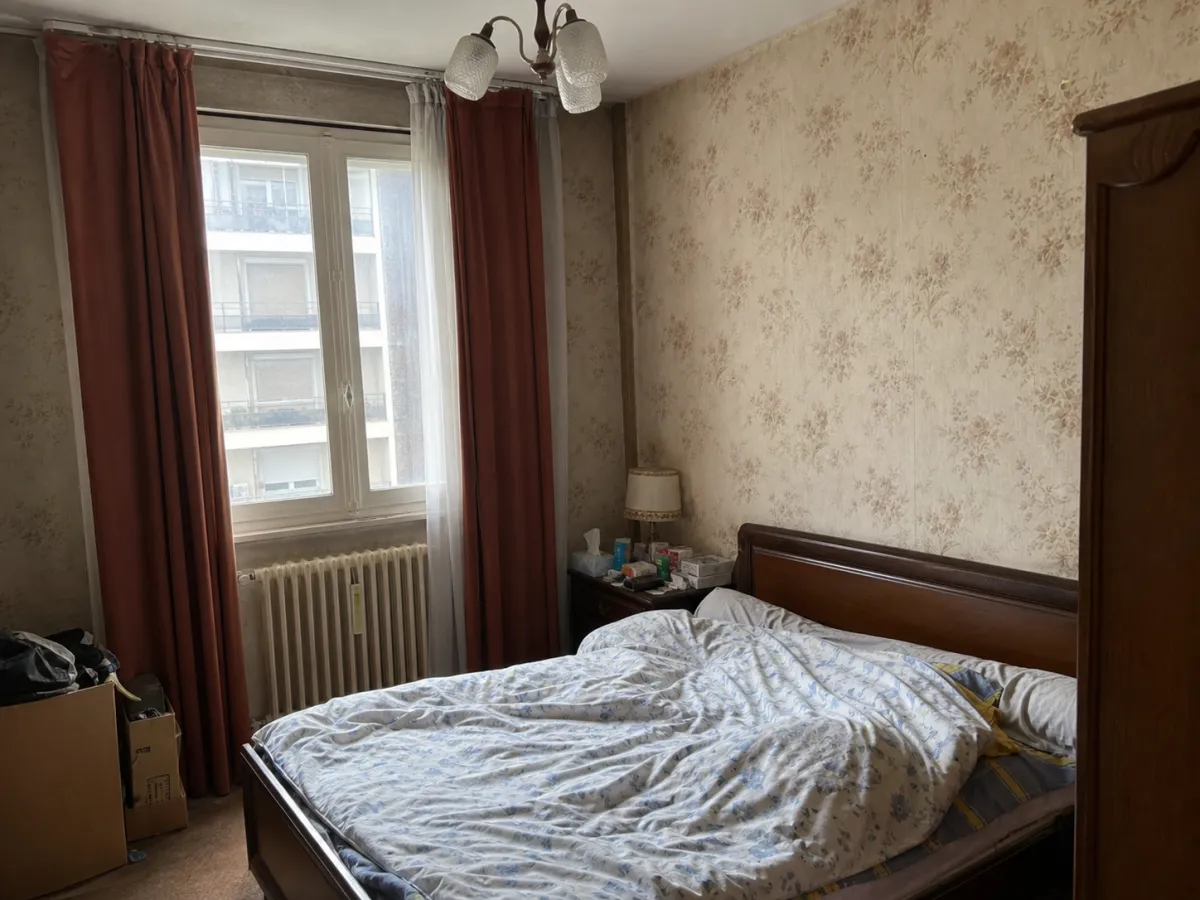 Before: AI-generated illustration of a hard, lived-in photo
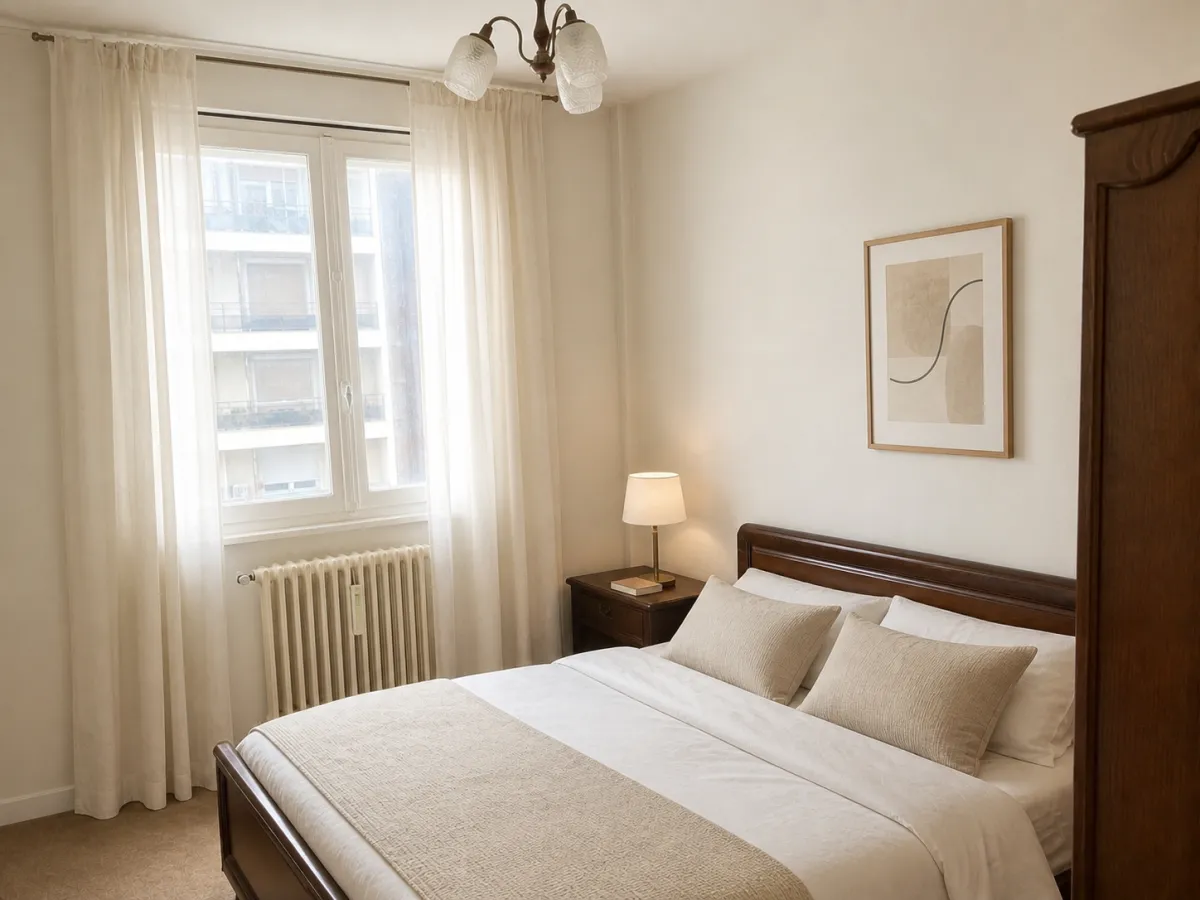 After: what passing the flaw test looks like. The window, the bed and the room's shape haven't moved
For a furnished room like this one, the tool you're testing is a restyle, not staging from empty; our AI interior design page runs exactly that on your own photo.
If you truly have zero budget
It can be done for one listing, with trade-offs worth naming honestly.
Stacking free tiers is the obvious move: 2 rooms from roompano, 5 designs from REimagineHome, 7 credits from Pedra — on paper, that covers a modest listing across three tools. The costs are non-monetary. Furniture style won't match across tools, so your living room and bedrooms may look like they were staged by three separate designers, because they were. Two of those three tiers have unstated watermark terms, so some renders may come back unusable and shrink your total. You'll spend an evening learning three interfaces. And you'll need to track which tool produced which image, because every published render still needs disclosure — free doesn't change your MLS obligations, only your invoice.
The quieter alternative: stage only the one or two rooms that sell the property, and publish the rest as honest photos of rooms tidied in real life — not digitally decluttered, since several MLSs treat virtually removing furniture as an alteration that must be disclosed. A tidy room photographed in good light is a perfectly respectable listing photo, and it comes with no compliance homework attached.
And then the reframe, which is where most zero-budget searches honestly end up. As of July 2026, paid AI staging plans run $14–99 a month — roughly $0.24–2.70 per image depending on plan — and human done-for-you services charge $16–30 per image. If the listing you're staging carries a commission, one month of the cheapest paid plan is a rounding error against it. The zero-budget constraint tends to be real for homeowners and first-time hosts; for a working agent, it's more often a proxy for "prove these tools are worth anything at all" — which is precisely the question free tiers exist to answer. The full price breakdown, including where the per-image math bends at volume, is in our virtual staging cost guide.
Frequently asked questions
Is there completely free virtual staging software?
Not at usable volume. The closest things, as of our July 8, 2026 audit: roompano (2 rooms, no card, no watermark), REimagineHome (5 designs, no card), and Pedra (7 credits plus one video and one tour on free signup). Every free tier in the category is sized for evaluating output quality, and allocations this small run out well before a full listing does.
Is there a free virtual staging app?
The same free tiers apply whether a tool markets itself as an app or a website, so the audit table above is the practical answer. Whatever you pick, judge it on the three fields that decide usability: how many free images, whether a card is required, and whether the export carries a watermark. For what it's worth, roompano runs in the browser with nothing to install, and its 3 free rooms come with the same terms on a phone as on a desktop.
Can I put free virtually staged photos on the MLS?
Watermarked ones, no — a vendor watermark has no place on a listing photo. A clean, full-resolution free render can generally be published if you disclose it the way your MLS requires: most MLS rules and NAR's "true picture" standard call for disclosing staged photos, and several MLSs now want the original unedited photo alongside the staged one. The rules vary by MLS, so check yours before uploading — our disclosure guide covers the specifics.
What's the catch with free virtual staging?
Three catches, in descending order of visibility: watermarks (stated by Collov, unstated by several others), volume (one to seven images, gone quickly), and unpublished terms (several pricing pages don't say whether a card is required or what the export looks like). And one catch that isn't hidden at all: vendors — us included — publish free tiers so you'll test the product and convert. That trade is fair exactly as long as you use the free images to judge, on your own photos, whether the paid product earns it.
Start with your hardest photo
This table will drift out of date eventually — free tiers change without announcements, which is why every claim above carries a verification date instead of asking for your trust. The method won't drift: take the photo with the dated radiator, run it through two or three of the no-card tiers, and check what survives the render. If you want roompano to be one of the three, the tool is here — 2 rooms, no card, and the output either earns a place in your listing workflow or it doesn't.