The workspace above is an AI virtual staging tool that runs in your browser. Upload a phone photo of a room, choose what the AI should do, and get three listing-ready variations. You don't need an app, a 360 camera or a floor plan. It's built for listing agents who need a vacant or lived-in room to photograph well this week, not after a stager's two-week lead time.
Six tools on the same photo
Every tool works on the photo you uploaded. Switch between them from the sidebar without uploading it again.
- Furnish: an empty room gets furniture at the right scale for the room type and style you pick. Furniture is preselected per room, and you can add or remove pieces.
- Restyle: the room is already furnished but dated or too personal. The AI changes the style, colors and textiles and leaves the walls alone. See AI interior design, or AI kitchen design for cabinets and countertops.
- Declutter: everyday clutter, boxes and laundry disappear, and the room stays the same room.
- Enhance: light, contrast and sharpness are corrected, content unchanged. The image is labeled as AI-retouched, not as virtually staged, because nothing was added.
- Sky: a gray sky becomes a daytime or golden-hour sky, for exteriors and curb-appeal shots.
- 360 panorama: up to five photos of one room, taken from different angles, become a 360° view buyers can drag around.
How to stage a room with AI
- Upload a photo. Shoot straight on, in good light, at chest height. A sharp photo beats a distorted wide-angle shot.
- Pick the room and a style. Eight room types (living room, bedroom, kitchen, bathroom, dining room, home office, entryway, outdoor) and twelve styles, from Scandinavian to Art Deco. By default only furniture and decor change; the floor, walls and ceiling change only if you check them.
- Generate. One credit gives you two variations. Keep the best one, run another style, or add a note in plain words ("no rug", "lighter wood").
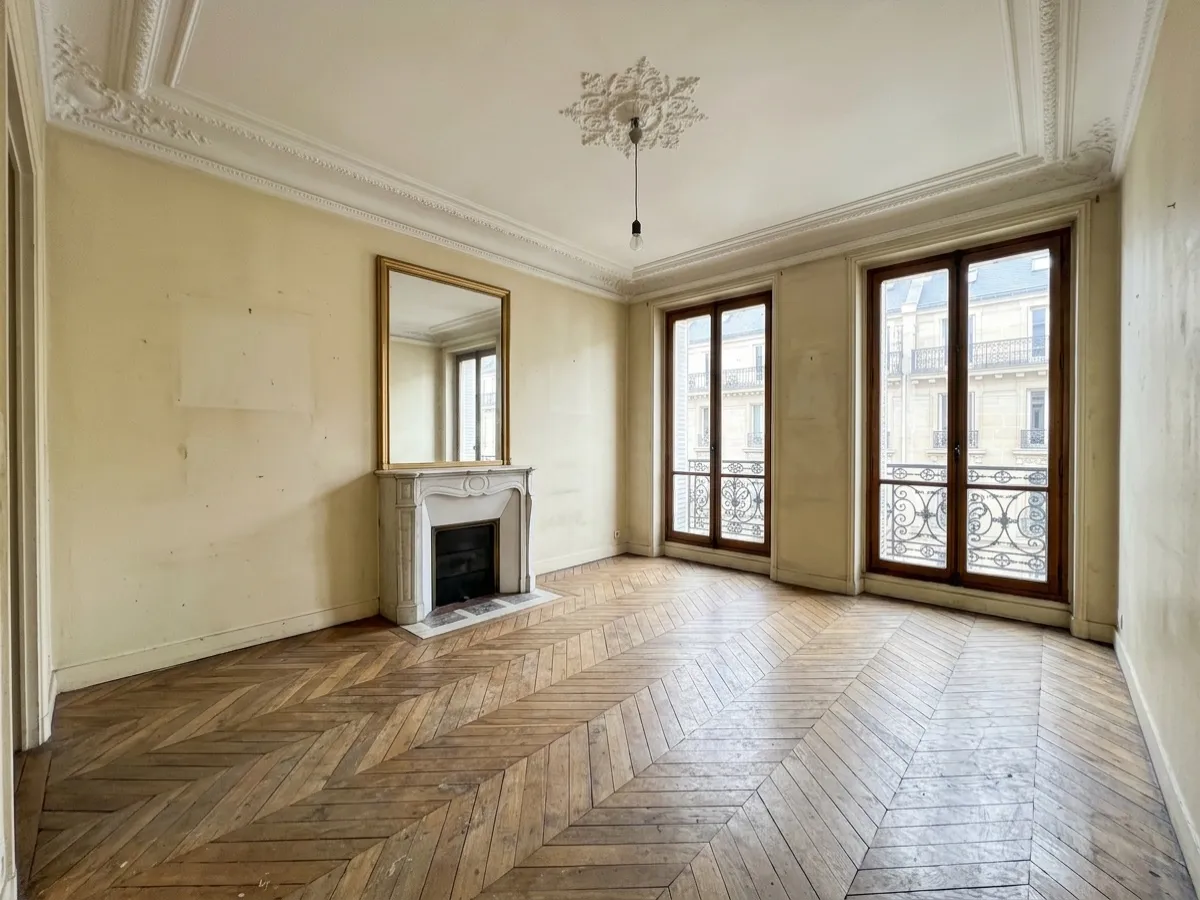 Before: AI-generated illustration of a vacant room
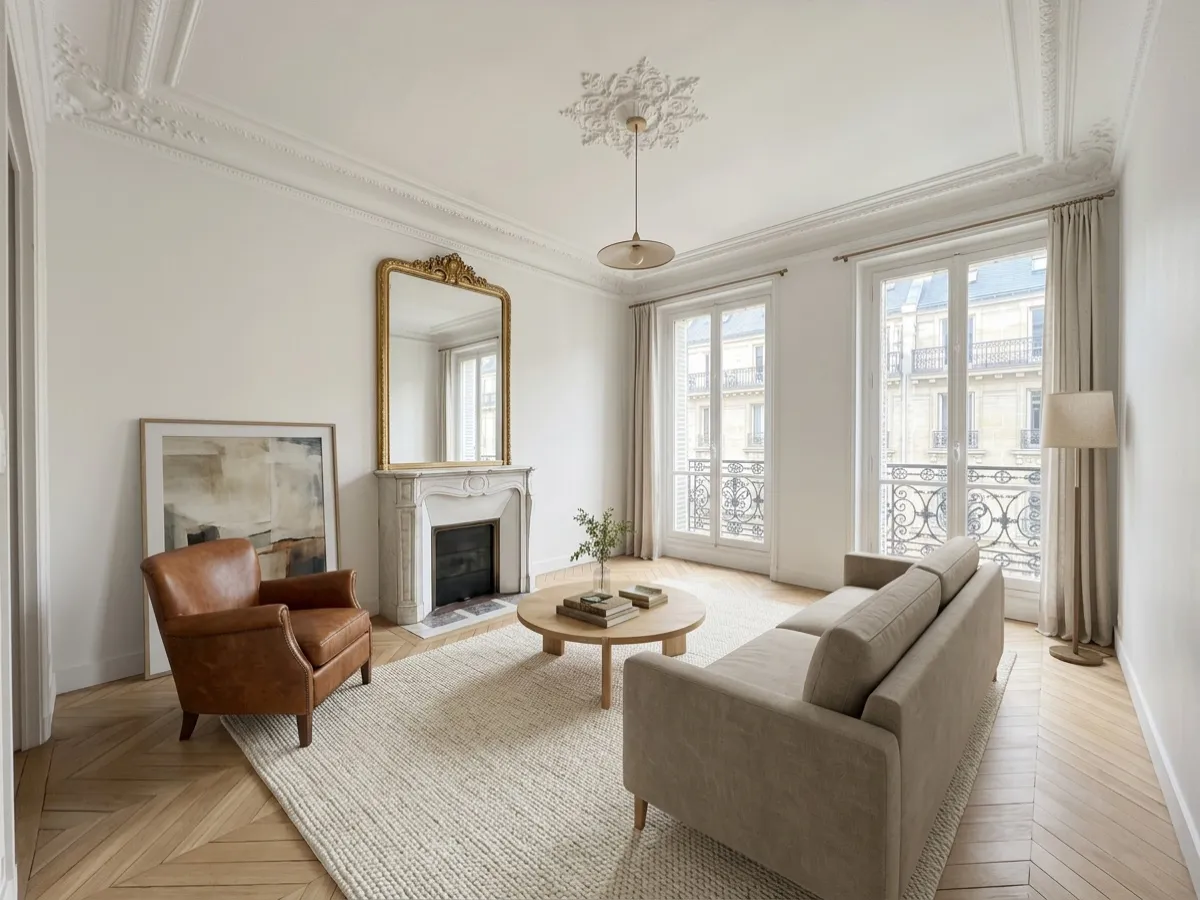 After: virtually staged, with walls, windows and floor unchanged
What it won't change
The AI adds furniture and changes decor. It doesn't move walls, enlarge windows, or paint over a water stain. That's deliberate. Most MLS rules and the NAR Code of Ethics allow virtual staging only when it's disclosed and the property itself is shown as it is.
So every image comes out with a visible "virtually staged" label, an AI marker in the metadata, and machine-readable C2PA Content Credentials. Your original photo is saved next to it, ready to show alongside the staged version. Our guide to virtual staging disclosure quotes the actual rules from NAR, California AB 723 and seven MLS rulebooks.
When AI staging pays off
- Vacant listings. Empty rooms look smaller in photos than in person. A furnished living room helps buyers judge the space.
- Lived-in listings. Sellers are still living there. Decluttering and restyling virtually saves asking them to clear out before the shoot.
- Listing presentations. Showing a seller their living room staged, on your phone, during the appointment is a strong way to win the listing.
On price, AI staging costs a fraction of a human editor. Our breakdown of virtual staging cost compares per-image prices, and BoxBrownie vs AI virtual staging covers when a human service is still the better call. If you're comparing tools, see the best virtual staging software and what each free virtual staging tier actually includes.
Share it with buyers
All images for one property are grouped on a public page, one per listing, that anyone can open without an account. Paste its link into your listing, text it to the seller, or share it on social media. You can unpublish it at any time. Paid plans also export images in 4K for portals and print.
Frequently asked questions
Is this AI virtual staging tool free?
You can start with a free trial, no credit card required, and test it on your own photos before picking a plan. One credit is one generation on one photo with two variations, and a failed generation is refunded automatically. Plans are on the pricing page.
Do I need to download an app?
No. Everything runs in the browser, on desktop or phone. A smartphone photo is enough.
How long does AI virtual staging take?
Usually under a minute per generation once the photo is uploaded and the style is chosen. Allow a few runs for a room you're really happy with.
Can I use AI-staged photos on Zillow or the MLS?
Yes, as long as they're disclosed as virtually staged and don't misrepresent the property's structure or condition. roompano adds the label to every image. Check your MLS's own rule too: some also ask for the unstaged photo or a note in the remarks.
Does the AI change walls or windows?
Not by default. Walls, windows, doors and room size stay as they are. The floor, walls and ceiling change only if you check those surfaces, and the result should still match the real property.
How is this different from physical staging?
Physical staging brings real furniture into the home, usually costs thousands of dollars and takes days to set up. AI virtual staging changes only the photos, in minutes. It doesn't replace the showing: buyers will see the room as it really is, which is why the disclosure matters.